SSC-32 Servo Sequencer Utility - Free to Download
Description
- Lynxmotion SSC-32 Servo Sequencer Utility
- Free interface for SSC-32 Servo Controller
- Easily control up to 32 servos
- Create, record and playback sequences
- Explore the full functionality of the SSC-32
- The default baud rate for the SSC-32U is 9600, not 115200
The SSC-32 Servo Sequencer Utility makes it easy to control the Lynxmotion SSC-32 Servo Controller and experiment with servo-based robotics and animatronics. It also enables you to move standard R/C servo motors individually, calibrates their position, store and playback motion sequences, upgrade the SSC-32 firmware and more.
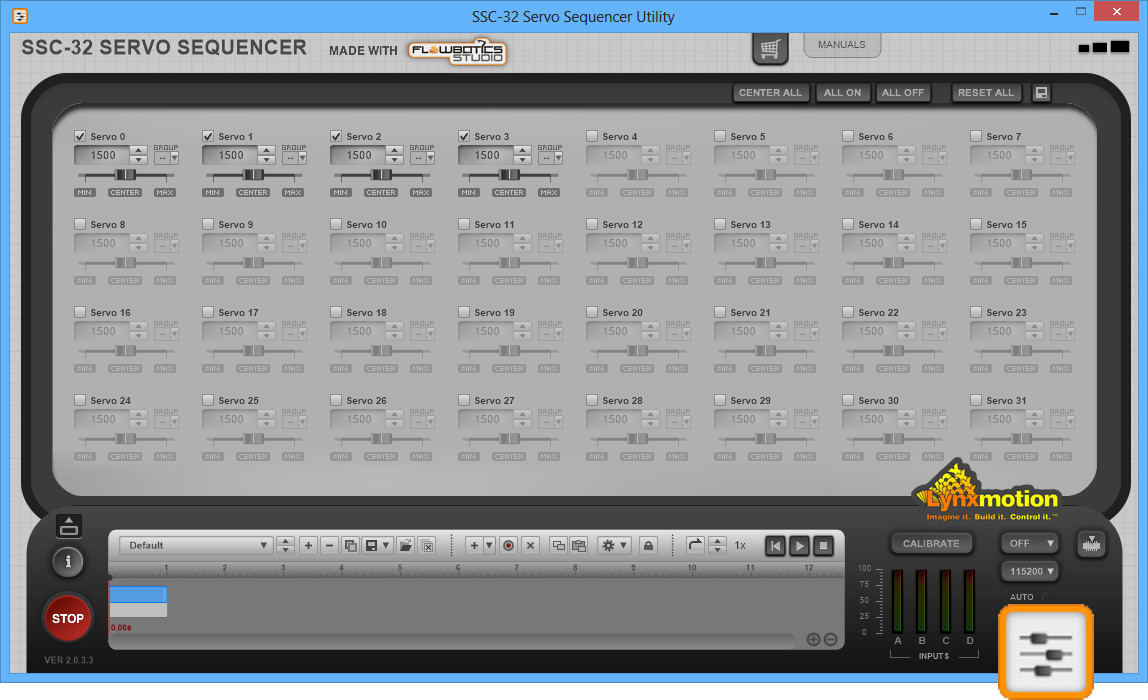
The main screen shows 32 sliders: one for each servo output. Users can manually adjust the sliders left and right to change each servo’s position (which corresponds to the output PWM signal between 500us and 2500us pulses). Each slider also has “Min” and “Max” position adjustments that allow you to limit the range of the PWM output to match any physical limitations imposed on the servo. In addition to being able to type an angle (in the form of a pulse) or use the up/down arrows for minor changes, there are shortcut buttons to reset one or all servos back to their neutral (1500us) position.
Based on which outputs are being used, the user can label each servo and disable any servos not in use. Users can also group servos so that moving one slider moves all the servos which are in the same group at once and multiple groups are possible. The user can then save all the project’s information to a file for future use.
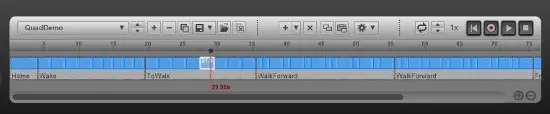
A very powerful feature of this utility is the new pattern sequencer component that is included in all the Lynxmotion demo projects found in FlowBotics Studio. This pattern sequencer gives the user the ability to create sequences of movements by adjusting the sliders and recording their current positions into keyframes. The size and order of the keyframes can be adjusted and modified to generate very smooth transitions from one position to another. For example, easily create a sequence which has your Lynxmotion Al5D robotic arm pick up an object and place it in a different location (and repeat).
Once a pattern is built, it can be added as a block in another pattern. This gives users the ability to create some basic patterns and then combine them to build much more complicated sequences. For example, for your rover, you can make a Move Forward, Move Backwards, Turn Left, and Turn Right pattern, and then combine them to build a more complicated sequence where the rover patrols a room by turning left and right between furniture.
The utility is also great for accessing some of the lower level features of the SSC-32 board, such as changing its internal calibration settings using on-screen knobs and adjusting specific configuration registers through the utility's command line console.
The SSC-32 Servo Sequencer Utility is an example of the type of program which can be built with Lynxmotion FlowBotics Studio Graphical Programming Software - Free to Download . Additionally, this utility is included as an open source project within FlowBotics Studio so you can see how it is made and modify it to suit your specific needs.
- 1x SSC-32 Servo Sequencer Utility
- Windows 7, Windows 10
J'ai utilisé l'utilitaire pour tester et centrer les servos. Fonctionne assez bien. Malheureusement, il n'est disponible que pour Windows et non pour Linux ou MacOS. Je l'ai fait fonctionner dans une instance de VMWare Fusion Windows 10, en installant les pilotes FTDI sur MacOS et en transférant le port série.
I used the utility to test and center the servos. Works quite well. Unfortunately, it is only available for Windows and not for Linux or MacOS. I got it to run inside a VMWare Fusion Windows 10 instance, by installing the FTDI drivers on MacOS and forwarding the serial port.
Estimate shipping
Refund Policy
If you are not satisfied with a product purchased from the Site, you may request a return within 30 days from the delivery date, unless the product is listed under the Return Exceptions below or is subject to specific return conditions noted on the product page.
This return policy also applies, as a minimum standard, to products sold and fulfilled by third-party vendors through the Marketplace.
Please review the Return Conditions, Return Exceptions and the process on How to Request a Return Authorization (RA) before initiating a return request.
Returns under this policy concern non-defective products. In the case of a confirmed manufacturing defect, remedies are handled under the Warranty terms, at the Vendor's discretion. See the Warranty section.
Return Conditions
To qualify for a refund under the 30-day return policy, all of the following conditions must be met:
- A valid Return Authorization (RA) number must be obtained prior to returning the product. Returns without an RA number will be refused.
- The RA number is valid for 30 days. The returned item must be received within that period.
- The RA number must be included with the return.
- Products must be returned in unused, unmodified condition (e.g., no scratches, alterations, missing parts, or signs of installation/use) and in their original packaging, suitable for resale.
- Shipping fees are non-refundable. Return shipping costs are the responsibility of the customer, except in cases of a product confirmed defective through RobotShop's troubleshooting process or of a verified shipping error by RobotShop.
- Refunds are processed within 7 days after receipt and inspection of the returned item.
- A $100 cleaning fee may apply to domestic robots returned in used or unclean condition.
- A 20% restocking fee may apply to large-quantity returns of items ordered specifically for the customer from the manufacturer or not part of RobotShop's standard inventory.
Return Exceptions
The following products are not eligible for return or refund under this policy:
- Used, damaged, or modified products — Items that show signs of use, wear, or alteration, making them unsuitable for resale.
- Consumables — Use and wear-and-tear components, altered or depleted through use (e.g., batteries, belts, brushes, gears, filament, tires, disposable bags, lubricants, greases, waxes, etc.). Not eligible for return once opened or used.
- Perishables — Goods liable to deteriorate or expire rapidly. Not eligible for return.
- Sealed goods (health or hygiene) — Items sealed for health-protection or hygiene reasons (e.g., masks, gloves, odor-absorbing products). Not eligible for return once unsealed.
- Build-it-yourself products and items requiring customer assembly — Including robots & kits, robot parts, and other products requiring assembly or soldering. Not eligible for return once assembled, soldered, or installed.
- Digital Goods, Software, and Apps — Final sale only, due to licensing restrictions.
- Clearance Items — Products identified as clearance or final sale, including end-of-life or discontinued items.
- Custom-made, personalized, or special-order items — Products manufactured, configured, adapted, or built to the customer's own specifications and requirements.
- On-Demand Items — Standard catalogue products not stocked by RobotShop and ordered specifically to fulfill a customer request.
- Professional & Specialized Equipment — See the Professional & Specialized Equipment Warranty page and Professional & Institutional Buyers (B2B) section in the Terms & Conditions.
How to Request a Return Authorization (RA)
While the same return policy applies, these orders require a separate contact process for returns.
- RobotShop Fulfilled Orders → submit a support ticket from your account under My Support Tickets.
- Marketplace Vendor Orders → submit a ticket from your account under My Marketplace Tickets to contact the vendor directly.
Note: Marketplace vendor products are normally labelled with SKUs starting with RM, and identified on the product page with the mention "Sold and fulfilled by [Vendor Name]".