


Description
- NOTE: An email with the activation code will be sent within 5 to 7 working days after purchase.
- Visual Show Automation Software (VSA Professional) V6.0
- The best visual solution for choreographing complex lighting, animatronic, audio, and video shows
- All pertinent information is displayed visually and is easily adjustable, no programming experience is needed
- Synchronize up to 4 audio files
- Synchronize one video file
- Capture events during playback with 4 track of joystick or mouse
- Control up to 128 servos, motors, relays and dimmers
VSA provides a graphical timeline of events. Events define a change in position (e.g., a servo) or value (e.g., a stage light dimmer). These colored events can be created consecutively to cause action for one device or created simultaneously for different devices to create a complex series of synchronized movements.
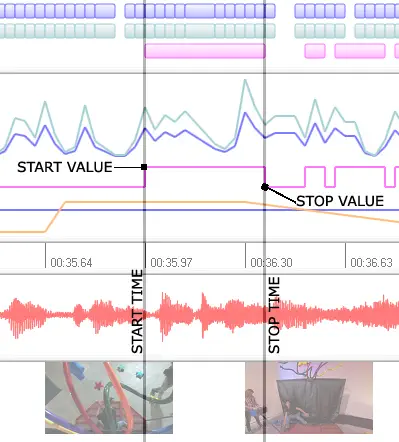 The start and stop values are depicted visually. While events allow motion to be scaled and adjusted as a group, the plot view allows individual start and stop values to be edited. From the plot view, the amplitude of the event values (i.e., servo position or dimmer value) can be adjusted with a quick drag and drop operation. Events can also be matched with the graphically depicted wave/MP3 and AVI files, greatly simplifying DJ lighting and animatronic lip sync.
Timeline events specify servo speed, relay position, and dimmer fade. Every animator has faced the challenge of sending commands in small step increments to produce the illusion of a variable servo or dimmer. Realizing that variable control is a necessity in any show production, VSA events are defined by a start and a stop value. When VSA encounters an event during playback, it automatically interpolates between the start and stop values to create a smooth motion or fading effect.
Import, mirror, and repeat events. In the course of any production, the same series of events will probably need to be repeated. VSA provides several options: first, series of events can be grouped and imported in to other routines. Second, a group of events can be highlighted and repeated any number of times. Third, an excellent technique for creating iterative motions, groups of events to be selected and then mirrored.
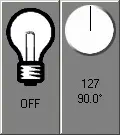
Visually define the position of a servo and brightness of a dimmer. VSA takes the guesswork out of determining the right position for a servo or dimmer. Rather than entering an obscure integer, VSA allows you to select the right value using a virtual device. As you drag the servo's arm or increase the brightness using the mouse or joystick, real-time commands are sent to the hardware. The entire show can be scripted without programming any value or code.
VSA events are edited in a drag & drop environment. VSA allows you to create and resize events by simply dragging with the mouse. As you drag, VSA draws guidelines that span the vertical axis, enabling events to be precisely aligned with the audio, video, and other events. Additionally, events can be grouped together and then moved or scaled as one -- allowing complex actions to be quickly modified as a whole.
Playback is animated and supports the use of multiple sound cards. As you begin to refine your routines, you will find the playback capabilities of VSA impressive. As VSA plays the routine, a play bar marks the current position -- showing you exactly which events are being executed and allowing you to halt or pause playback. VSA even helps you fine tune portions by providing markers that enable you to playback small parts of a routine. During playback, VSA can also output different audio files to multiple sound cards and different video streams to different monitors. For example, each animated character in a skit could have its own USB sound card and speakers.
Note: This software is delivered digitally directly from the manufacturer post-purchase. After your purchase is confirmed, the manufacturer will send you a link for digital download or provide access to the software through their own platform.
System Requirements
- Windows 10 (32 or 64-bit versions)
- Intel/AMD i5 with 8GB of RAM
- Properly configured, supported hardware
- Available, properly configured serial, parallel, or USB port
- Sound card(s) and speakers (required for audio playback)
- Properly configured video devices and compatible video (required for video playback). Supported video formats include raw RGB AVI and XVid AVI.