
Parallax P2 Eval HUB75 Adapter Board
Description
- Parallax P2 Eval HUB75 Adapter Board
- Drives HUB75 RGB LED Matrix panels
- Compatible with P2 Eval Board, P2 Edge Module Breadboard, and P2 Edge Mini Breakout Board
- Supports both HUB75 and HUB75E varieties
- Provides 3.3V to 5V level shifting for all signals at the HUB75 Connector
- Ideal for scrolling text messages, large-format displays, and customizing lighting colors
The Parallax P2 Eval HUB75 Adapter Board is a retiring product from the Parallax store. This adapter board is designed to provide a straightforward connection and drive a HUB75 RGB LED Matrix panel. It can also be used with a small number of HUB75 Matrix panels that are daisy-chained together, all powered by a Propeller 2 multicore microcontroller.
The HUB75 RGB LED Panel, with dimensions of 128 x 128 mm and 64 x 64 dots, is a compatible option for this adapter board. It is also compatible with development systems such as the P2 Eval Board, the P2 Edge Module Breadboard, or the P2 Edge Mini Breakout Board when used with a P2 Edge Module.
The HUB75 displays are not currently stocked by Parallax, hence a HUB75-enabled LED panel will be required. The adapter board supports both HUB75 and HUB75E varieties, with the "E" indicating five address lines as opposed to 3 or 4.
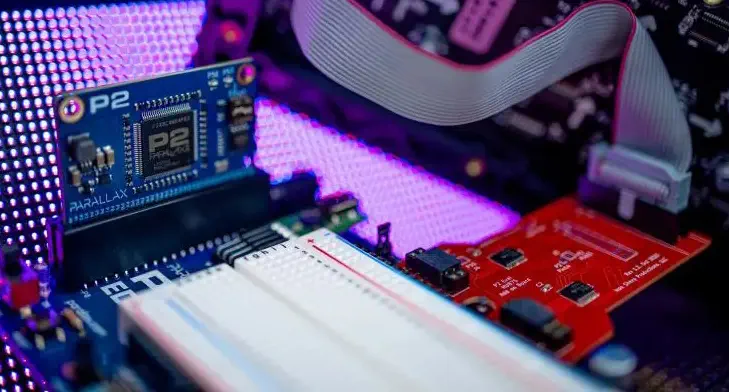
The HUB75 RGB displays are distinguished by their pixel spacing, ranging from P1.25 to P8, where P2 is 2 x 2mm and P3 is 3 x 3mm, and so on. Some users may prefer the finer pitch P2, while others may opt for the pitch P8 for a larger physical size.
The Eval P2 HUB75 Adapter Board provides 3.3V to 5V level shifting for all signals at the HUB75 Connector and supports HUB75 panels which use A-B-C, A-B-C-D, and A-B-C-D-E Address lines. It is ideal for use with the ISP HUB75 Driver found in the P2 Object Exchange (OBEX) and is compatible with Propeller 2 development boards with side-by-side 2×6 accessory headers.
The applications of the P2 Eval HUB75 Adapter Board include scrolling text messages, connecting additional HUB75 panels to provide a large-format display, and customizing lighting colors, saturation, and intensity.
- 1x Parallax P2 Eval HUB75 Adapter Board
- 1.9 x 2.8 inch / 48 x 71 mm
- Voltage: +5 VDC (supplied by P2 Development Board)
- Maximum clock rate: 70 MHz (limited by the level shifter I/Cs)
- Form factor: dual 2x6-pin female pass-through headers with 0.1-inch spacing
Estimate shipping
Refund Policy
If you are not satisfied with a product purchased from the Site, you may request a return within 30 days from the delivery date, unless the product is listed under the Return Exceptions below or is subject to specific return conditions noted on the product page.
This return policy also applies, as a minimum standard, to products sold and fulfilled by third-party vendors through the Marketplace.
Please review the Return Conditions, Return Exceptions and the process on How to Request a Return Authorization (RA) before initiating a return request.
Returns under this policy concern non-defective products. In the case of a confirmed manufacturing defect, remedies are handled under the Warranty terms, at the Vendor's discretion. See the Warranty section.
Return Conditions
To qualify for a refund under the 30-day return policy, all of the following conditions must be met:
- A valid Return Authorization (RA) number must be obtained prior to returning the product. Returns without an RA number will be refused.
- The RA number is valid for 30 days. The returned item must be received within that period.
- The RA number must be included with the return.
- Products must be returned in unused, unmodified condition (e.g., no scratches, alterations, missing parts, or signs of installation/use) and in their original packaging, suitable for resale.
- Shipping fees are non-refundable. Return shipping costs are the responsibility of the customer, except in cases of a product confirmed defective through RobotShop's troubleshooting process or of a verified shipping error by RobotShop.
- Refunds are processed within 7 days after receipt and inspection of the returned item.
- A $100 cleaning fee may apply to domestic robots returned in used or unclean condition.
- A 20% restocking fee may apply to large-quantity returns of items ordered specifically for the customer from the manufacturer or not part of RobotShop's standard inventory.
Return Exceptions
The following products are not eligible for return or refund under this policy:
- Used, damaged, or modified products — Items that show signs of use, wear, or alteration, making them unsuitable for resale.
- Consumables — Use and wear-and-tear components, altered or depleted through use (e.g., batteries, belts, brushes, gears, filament, tires, disposable bags, lubricants, greases, waxes, etc.). Not eligible for return once opened or used.
- Perishables — Goods liable to deteriorate or expire rapidly. Not eligible for return.
- Sealed goods (health or hygiene) — Items sealed for health-protection or hygiene reasons (e.g., masks, gloves, odor-absorbing products). Not eligible for return once unsealed.
- Build-it-yourself products and items requiring customer assembly — Including robots & kits, robot parts, and other products requiring assembly or soldering. Not eligible for return once assembled, soldered, or installed.
- Digital Goods, Software, and Apps — Final sale only, due to licensing restrictions.
- Clearance Items — Products identified as clearance or final sale, including end-of-life or discontinued items.
- Custom-made, personalized, or special-order items — Products manufactured, configured, adapted, or built to the customer's own specifications and requirements.
- On-Demand Items — Standard catalogue products not stocked by RobotShop and ordered specifically to fulfill a customer request.
- Professional & Specialized Equipment — See the Professional & Specialized Equipment Warranty page and Professional & Institutional Buyers (B2B) section in the Terms & Conditions.
How to Request a Return Authorization (RA)
While the same return policy applies, these orders require a separate contact process for returns.
- RobotShop Fulfilled Orders → submit a support ticket from your account under My Support Tickets.
- Marketplace Vendor Orders → submit a ticket from your account under My Marketplace Tickets to contact the vendor directly.
Note: Marketplace vendor products are normally labelled with SKUs starting with RM, and identified on the product page with the mention "Sold and fulfilled by [Vendor Name]".