
Firgelli Automations 2-4 Channel Remote Control System
Description
- Ideal for remote control of actuators
- Each remote control has 4 buttons, 2 buttons per actuator
- 2 modes, sustaining or latching
- 10A max per channel
The Firgelli Automations 2-4 Channel Remote Control System comes pre-programmed in sustaining mode, this means that the actuator will move for as long as your finger is held on the button. In latching mode you only have to press the button once and the actuator will go all the way to the end. To change the mode, all you have to do is open up the case on the receiver and remove the jumper that connects 2 pins together and place it on just 1 pin, then you need to remove the power to the remote receiver and then apply the power again, this resets the system.
To program more remotes you have to press and hold the button on the circuit board, you will have to open the case first. Hold the button for a few seconds until the red LED flashes. Then press any button on each of the remotes you want to program, 1 at a time, so if you have 4 remotes you need to program all the remotes, even if they were already programmed, and just press any one of the 4 buttons on each remote. Then remove the power from the receiver and plug it back in again. Now all remotes should work with the receiver. It is suggested to use a 5 amp fuse to protect the remote system.
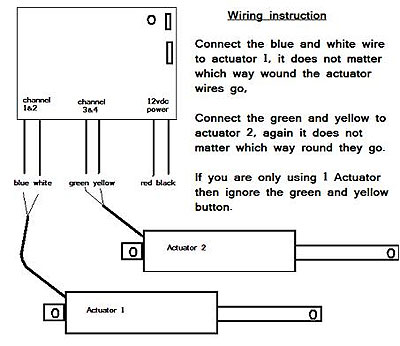
- 2 or 4 channel RF receiver
- Two 4 button programmable remotes
- Instruction manual
Specifications:
- Radio Frequency 310 MHz 2 or 4 channel
- 12vdc input
Product works great and is robust. However enclosure is not water proof, and the antenna is not removeable. So to put it inside another enclosure you better make sure it is plastic and that the antenna won't be blocked. It would be 100% perfect if you could attach an external antenna to the receiver board when mounting inside a metal enclosure.
Le produit fonctionne très bien et est robuste. Cependant, l'enceinte n'est pas étanche et l'antenne n'est pas amovible. Donc, pour le placer dans un autre boîtier, vous devez vous assurer qu'il est en plastique et que l'antenne ne sera pas bloquée. Ce serait parfait à 100% si vous pouviez attacher une antenne externe à la carte de récepteur lors du montage à l'intérieur d'un boîtier métallique.
Estimate shipping
Refund Policy
If you are not satisfied with a product purchased from the Site, you may request a return within 30 days from the delivery date, unless the product is listed under the Return Exceptions below or is subject to specific return conditions noted on the product page.
This return policy also applies, as a minimum standard, to products sold and fulfilled by third-party vendors through the Marketplace.
Please review the Return Conditions, Return Exceptions and the process on How to Request a Return Authorization (RA) before initiating a return request.
Returns under this policy concern non-defective products. In the case of a confirmed manufacturing defect, remedies are handled under the Warranty terms, at the Vendor's discretion. See the Warranty section.
Return Conditions
To qualify for a refund under the 30-day return policy, all of the following conditions must be met:
- A valid Return Authorization (RA) number must be obtained prior to returning the product. Returns without an RA number will be refused.
- The RA number is valid for 30 days. The returned item must be received within that period.
- The RA number must be included with the return.
- Products must be returned in unused, unmodified condition (e.g., no scratches, alterations, missing parts, or signs of installation/use) and in their original packaging, suitable for resale.
- Shipping fees are non-refundable. Return shipping costs are the responsibility of the customer, except in cases of a product confirmed defective through RobotShop's troubleshooting process or of a verified shipping error by RobotShop.
- Refunds are processed within 7 days after receipt and inspection of the returned item.
- A $100 cleaning fee may apply to domestic robots returned in used or unclean condition.
- A 20% restocking fee may apply to large-quantity returns of items ordered specifically for the customer from the manufacturer or not part of RobotShop's standard inventory.
Return Exceptions
The following products are not eligible for return or refund under this policy:
- Used, damaged, or modified products — Items that show signs of use, wear, or alteration, making them unsuitable for resale.
- Consumables — Use and wear-and-tear components, altered or depleted through use (e.g., batteries, belts, brushes, gears, filament, tires, disposable bags, lubricants, greases, waxes, etc.). Not eligible for return once opened or used.
- Perishables — Goods liable to deteriorate or expire rapidly. Not eligible for return.
- Sealed goods (health or hygiene) — Items sealed for health-protection or hygiene reasons (e.g., masks, gloves, odor-absorbing products). Not eligible for return once unsealed.
- Build-it-yourself products and items requiring customer assembly — Including robots & kits, robot parts, and other products requiring assembly or soldering. Not eligible for return once assembled, soldered, or installed.
- Digital Goods, Software, and Apps — Final sale only, due to licensing restrictions.
- Clearance Items — Products identified as clearance or final sale, including end-of-life or discontinued items.
- Custom-made, personalized, or special-order items — Products manufactured, configured, adapted, or built to the customer's own specifications and requirements.
- On-Demand Items — Standard catalogue products not stocked by RobotShop and ordered specifically to fulfill a customer request.
- Professional & Specialized Equipment — See the Professional & Specialized Equipment Warranty page and Professional & Institutional Buyers (B2B) section in the Terms & Conditions.
How to Request a Return Authorization (RA)
While the same return policy applies, these orders require a separate contact process for returns.
- RobotShop Fulfilled Orders → submit a support ticket from your account under My Support Tickets.
- Marketplace Vendor Orders → submit a ticket from your account under My Marketplace Tickets to contact the vendor directly.
Note: Marketplace vendor products are normally labelled with SKUs starting with RM, and identified on the product page with the mention "Sold and fulfilled by [Vendor Name]".
