
ESP8266 Thing Development Board w/ Headers
Description
- WiFi-enabled microcontroller with pre-soldered headers
- Onboard FTDI USB-to-Serial
- Can be programmed with Arduino IDE
- Integrated TCP/IP protocol stack, TR switch, balun, LNA, power amplifier and matching network
- Operating range: 3.3V- 3.6V (this version does not have a built-in LiPo charger)
- +19.5dBm output power in 802.11b mode
The ESP8266 Thing Development Board w/ Headers is a development board that has been solely designed around the ESP8266, with an integrated FTDI USB-to-Serial chip. The ESP8266 is a WiFi-enabled microcontroller. Like any microcontroller, it can be programmed to blink LEDs, trigger relays, monitor sensors or automate coffee makers. With an integrated WiFi controller, the ESP8266 is a one-stop shop for almost any internet-connected project.
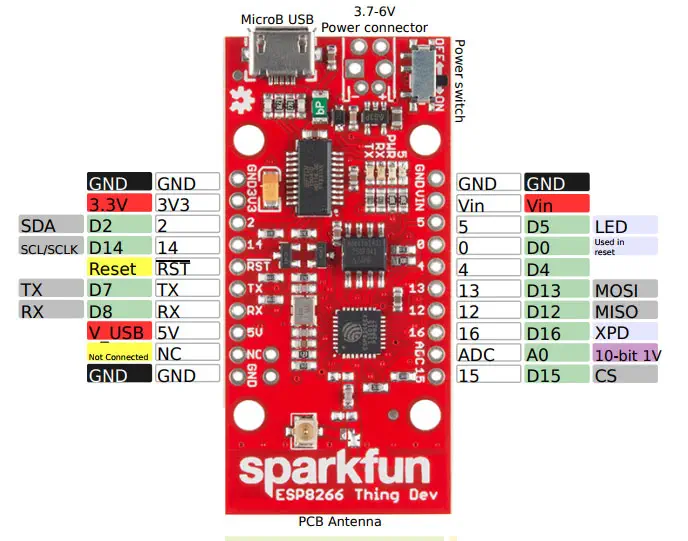
To top it all off, the ESP8266 is incredibly easy to use; firmware can be developed in Arduino and uploaded over a simple serial interface. The ESP8266 Thing Development Board breaks out all of the module’s pins with pre-soldered headers, and the USB-to-serial converter means you don’t need any peripheral components to program the chip. Just plug in a USB cable, download the Arduino board definitions, and start IoT-ing.
Features
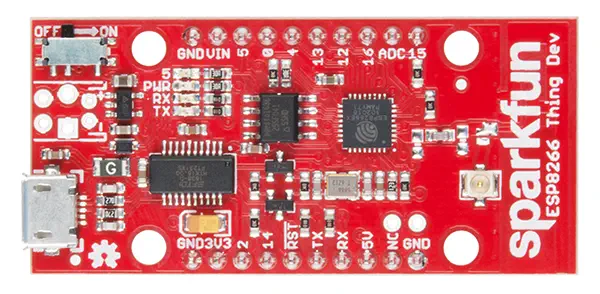
- The pins are broken out to two breadboard-compatible rows
- The USB connector sits next to an optional power supply input
- It also features an ON/OFF switch, controlling power to the ESP8266
- LEDs toward the inside of the board indicate power, charge and status of the IC
- The ESP8266’s maximum voltage is 3.6V, so the Thing has an onboard 3.3V regulator to deliver a safe, consistent voltage to the IC
- I/O pins also run at 3.3V; you’ll need to level shift any 5V signals running into the IC
- The board includes footprints for a 2-pin JST, 2-pin 3.5mm screw terminal, or a simple 0.1"-pitch 2-pin header
- Unlike the original ESP8266 Thing, the ESP8266 Thing Dev Board does not have a built-in LiPo charger
The Thing Dev Board even includes a PCB trace antenna as a default WiFi antenna. If you need to connect a more sensitive antenna, or need to route outside an enclosure, a U.FL connector is also available on the board.
- 1 x ESP8266 Thing Developpment Board w/ Headers
Estimate shipping
Refund Policy
If you are not satisfied with a product purchased from the Site, you may request a return within 30 days from the delivery date, unless the product is listed under the Return Exceptions below or is subject to specific return conditions noted on the product page.
This return policy also applies, as a minimum standard, to products sold and fulfilled by third-party vendors through the Marketplace.
Please review the Return Conditions, Return Exceptions and the process on How to Request a Return Authorization (RA) before initiating a return request.
Returns under this policy concern non-defective products. In the case of a confirmed manufacturing defect, remedies are handled under the Warranty terms, at the Vendor's discretion. See the Warranty section.
Return Conditions
To qualify for a refund under the 30-day return policy, all of the following conditions must be met:
- A valid Return Authorization (RA) number must be obtained prior to returning the product. Returns without an RA number will be refused.
- The RA number is valid for 30 days. The returned item must be received within that period.
- The RA number must be included with the return.
- Products must be returned in unused, unmodified condition (e.g., no scratches, alterations, missing parts, or signs of installation/use) and in their original packaging, suitable for resale.
- Shipping fees are non-refundable. Return shipping costs are the responsibility of the customer, except in cases of a product confirmed defective through RobotShop's troubleshooting process or of a verified shipping error by RobotShop.
- Refunds are processed within 7 days after receipt and inspection of the returned item.
- A $100 cleaning fee may apply to domestic robots returned in used or unclean condition.
- A 20% restocking fee may apply to large-quantity returns of items ordered specifically for the customer from the manufacturer or not part of RobotShop's standard inventory.
Return Exceptions
The following products are not eligible for return or refund under this policy:
- Used, damaged, or modified products — Items that show signs of use, wear, or alteration, making them unsuitable for resale.
- Consumables — Use and wear-and-tear components, altered or depleted through use (e.g., batteries, belts, brushes, gears, filament, tires, disposable bags, lubricants, greases, waxes, etc.). Not eligible for return once opened or used.
- Perishables — Goods liable to deteriorate or expire rapidly. Not eligible for return.
- Sealed goods (health or hygiene) — Items sealed for health-protection or hygiene reasons (e.g., masks, gloves, odor-absorbing products). Not eligible for return once unsealed.
- Build-it-yourself products and items requiring customer assembly — Including robots & kits, robot parts, and other products requiring assembly or soldering. Not eligible for return once assembled, soldered, or installed.
- Digital Goods, Software, and Apps — Final sale only, due to licensing restrictions.
- Clearance Items — Products identified as clearance or final sale, including end-of-life or discontinued items.
- Custom-made, personalized, or special-order items — Products manufactured, configured, adapted, or built to the customer's own specifications and requirements.
- On-Demand Items — Standard catalogue products not stocked by RobotShop and ordered specifically to fulfill a customer request.
- Professional & Specialized Equipment — See the Professional & Specialized Equipment Warranty page and Professional & Institutional Buyers (B2B) section in the Terms & Conditions.
How to Request a Return Authorization (RA)
While the same return policy applies, these orders require a separate contact process for returns.
- RobotShop Fulfilled Orders → submit a support ticket from your account under My Support Tickets.
- Marketplace Vendor Orders → submit a ticket from your account under My Marketplace Tickets to contact the vendor directly.
Note: Marketplace vendor products are normally labelled with SKUs starting with RM, and identified on the product page with the mention "Sold and fulfilled by [Vendor Name]".