
Arduino Mega 2560 Microcontroller Rev3
Description
- User friendly USB programmable Arduino Microcontroller
- Open Source design based on the larger ATmega2560
- 54 digital I/O Pins and 16 analog I/O Pins
- 256 KB of Flash Memory, 8 KB of SRAM, and 4kB of EEPROM
- Clock Speed: 16 MHz
The Arduino Mega 2560 Microcontroller Rev3 is a microcontroller board based on the ATmega2560. It has 54 digital input/output pins (of which 14 can be used as PWM outputs), 16 analog inputs, 4 UARTs (hardware serial ports), a 16 MHz crystal oscillator, a USB connection, a power jack, an ICSP header, and a reset button. It contains everything needed to support the microcontroller; simply connect it to a computer with a USB cable or power it with a AC-to-DC adapter or battery to get started. The Arduino Mega is compatible with most shields designed for the Arduino Uno, Duemilanove, or Diecimila.

The Arduino Mega can be powered via the 1.5m USB Cable Type A to B or with an external power supply. The Mega2560 differs from all preceding boards in that it does not use the FTDI USB-to-serial driver chip. Instead, it features the Atmega8U2 programmed as a USB-to-serial converter.
Each of the 54 digital pins on the Mega can be used as an input or output, using pinMode(), digitalWrite(), and digitalRead() functions. It also has 16 analog inputs, each of which provide 10 bits of resolution (i.e. 1024 different values).
The Arduino Mega2560 has a number of facilities for communicating with a computer, another Arduino, or other microcontrollers. The ATmega2560 provides four hardware UARTs for TTL (5V) serial communication. An ATmega8U2 on the board channels one of these over USB and provides a virtual com port to software on the computer. Furthermore, it supports I2C (TWI) and SPI communication. The Arduino software includes a Wire library to simplify use of the I2C bus; see the documentation on the Wiring website for details. For SPI communication, use the SPI library.
The Arduino Mega2560 can be programmed with the free and open source Arduino IDE hrough a USB connection without needing any extra hardware thanks to its preburnt bootloader. You can also bypass the bootloader and program the microcontroller through the Cytron USB ICSP PIC Programmer header.
The Arduino Mega can be powered via the USB connection or with an external power supply. The power source is selected automatically.
External (non-USB) power can come either from an AC-to-DC adapter (wall-wart) or battery. The adapter can be connected by plugging a 2.1mm center-positive plug into the board's power jack. Leads from a battery can be inserted in the Gnd and Vin pin headers of the POWER connector.
The board can operate on an external supply of 6 to 20 volts. If supplied with less than 7V, however, the 5V pin may supply less than five volts and the board may be unstable. If using more than 12V, the voltage regulator may overheat and damage the board. The recommended range is 7 to 12 volts.

Power
The power pins are as follows:
- VIN. The input voltage to the Arduino board when it's using an external power source (as opposed to 5 volts from the USB connection or other regulated power source). You can supply voltage through this pin, or, if supplying voltage via the power jack, access it through this pin.
- 5V. This pin outputs a regulated 5V from the regulator on the board. The board can be supplied with power either from the DC power jack (7 - 12V), the USB connector (5V), or the VIN pin of the board (7-12V). Supplying voltage via the 5V or 3.3V pins bypasses the regulator, and can damage your board. We don't advise it.
- 3V3. A 3.3 volt supply generated by the on-board regulator. Maximum current draw is 50 mA.
- GND. Ground pins.
- IOREF. This pin on the Arduino board provides the voltage reference with which the microcontroller operates. A properly configured shield can read the IOREF pin voltage and select the appropriate power source or enable voltage translators on the outputs for working with the 5V or 3.3V.
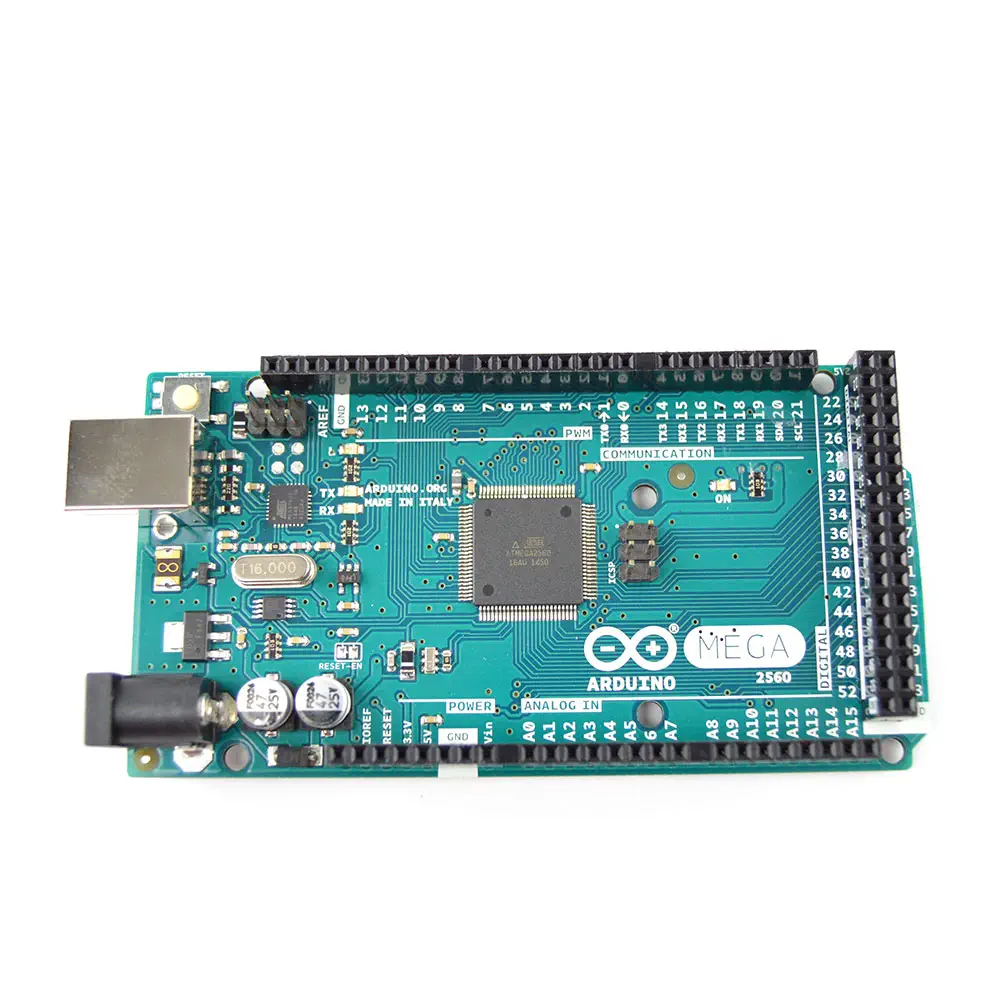
The Arduino Mega2560 is designed to be compatible with most shields designed for the Uno, Diecimila or Duemilanove.
4 inches by 2.1 inches with the USB connector and power jack extending beyond the former dimension.
PDF Documents
Website
- RobotShop Learning Center: Arduino 5 Minute Tutorials
- Arduino Language Reference and Website
Forum
- Microcontroller: ATmega2560
- Operating Voltage: 5V
- Input Voltage (recommended): 7-12V
- Input Voltage (limits): 6-20V
- Digital I/O Pins: 54 (of which 14 provide PWM output)
- Analog Input Pins: 16
- DC Current per I/O Pin: 40 mA
- DC Current for 3.3V Pin: 50 mA
- Flash Memory: 256 KB of which 8 KB used by bootloader
- SRAM: 8 KB
- EEPROM: 4 KB
- Clock Speed: 16 MHz
Execelent product. One of the best modules ever built in my opinion.
I have used the Arduino Mega for several projects. Tons of pins!
I am very pleased with RobotShop. The products work very well and delivered quickly
Great product for autonomous systems, well documented, Great services from robotshop, Thank you
I am considering moving from PICs and Basic language to Arduino for my robotics projects. While the hardware is more flexible, learning the programming language is difficult.
Estimate shipping
Refund Policy
If you are not satisfied with a product purchased from the Site, you may request a return within 30 days from the delivery date, unless the product is listed under the Return Exceptions below or is subject to specific return conditions noted on the product page.
This return policy also applies, as a minimum standard, to products sold and fulfilled by third-party vendors through the Marketplace.
Please review the Return Conditions, Return Exceptions and the process on How to Request a Return Authorization (RA) before initiating a return request.
Returns under this policy concern non-defective products. In the case of a confirmed manufacturing defect, remedies are handled under the Warranty terms, at the Vendor's discretion. See the Warranty section.
Return Conditions
To qualify for a refund under the 30-day return policy, all of the following conditions must be met:
- A valid Return Authorization (RA) number must be obtained prior to returning the product. Returns without an RA number will be refused.
- The RA number is valid for 30 days. The returned item must be received within that period.
- The RA number must be included with the return.
- Products must be returned in unused, unmodified condition (e.g., no scratches, alterations, missing parts, or signs of installation/use) and in their original packaging, suitable for resale.
- Shipping fees are non-refundable. Return shipping costs are the responsibility of the customer, except in cases of a product confirmed defective through RobotShop's troubleshooting process or of a verified shipping error by RobotShop.
- Refunds are processed within 7 days after receipt and inspection of the returned item.
- A $100 cleaning fee may apply to domestic robots returned in used or unclean condition.
- A 20% restocking fee may apply to large-quantity returns of items ordered specifically for the customer from the manufacturer or not part of RobotShop's standard inventory.
Return Exceptions
The following products are not eligible for return or refund under this policy:
- Used, damaged, or modified products — Items that show signs of use, wear, or alteration, making them unsuitable for resale.
- Consumables — Use and wear-and-tear components, altered or depleted through use (e.g., batteries, belts, brushes, gears, filament, tires, disposable bags, lubricants, greases, waxes, etc.). Not eligible for return once opened or used.
- Perishables — Goods liable to deteriorate or expire rapidly. Not eligible for return.
- Sealed goods (health or hygiene) — Items sealed for health-protection or hygiene reasons (e.g., masks, gloves, odor-absorbing products). Not eligible for return once unsealed.
- Build-it-yourself products and items requiring customer assembly — Including robots & kits, robot parts, and other products requiring assembly or soldering. Not eligible for return once assembled, soldered, or installed.
- Digital Goods, Software, and Apps — Final sale only, due to licensing restrictions.
- Clearance Items — Products identified as clearance or final sale, including end-of-life or discontinued items.
- Custom-made, personalized, or special-order items — Products manufactured, configured, adapted, or built to the customer's own specifications and requirements.
- On-Demand Items — Standard catalogue products not stocked by RobotShop and ordered specifically to fulfill a customer request.
- Professional & Specialized Equipment — See the Professional & Specialized Equipment Warranty page and Professional & Institutional Buyers (B2B) section in the Terms & Conditions.
How to Request a Return Authorization (RA)
While the same return policy applies, these orders require a separate contact process for returns.
- RobotShop Fulfilled Orders → submit a support ticket from your account under My Support Tickets.
- Marketplace Vendor Orders → submit a ticket from your account under My Marketplace Tickets to contact the vendor directly.
Note: Marketplace vendor products are normally labelled with SKUs starting with RM, and identified on the product page with the mention "Sold and fulfilled by [Vendor Name]".